


Shopping list — Lister
4.0966.00 Reviews
App Specs
- Version
- Varies with Device
- Updated On
- License
- Free
- Downloads
- 1,000,000+
- Developer
- Lister Studios
- Categories
- Shopping
- Platform
- Android
Screenshots






 Analysis by AppCompare
Have you ever found yourself wandering through the grocery store, trying to remember if you’ve already snagged that jar of peanut butter? If you’re like me and have a knack for forgetting the essentials, then Shopping list — Lister might just be the app you’ve been waiting for. Let me take you through my experience with it.
A small tool for a specific kind of shopping problem
My main takeaway is that Lister makes the most sense when the list itself is the problem: you remember errands at inconvenient times, shop for several different occasions, or share routine purchases with someone else. It is a free shopping app from Lister Studios, and its uncomplicated purpose is a real strength. It is not trying to turn a grocery run into a full meal-planning or budgeting system.
That focus also sets expectations. The app has a four-out-of-five average from around 26,000 ratings, with more than a million installs. Those figures suggest that plenty of people use it, but I would judge it by whether its basic list workflow fits your habits, not by popularity alone. It is rated for everyone, and the app itself is free to install, though in-app purchases range from small optional amounts to considerably more expensive items. I would check any purchase screen carefully before confirming anything.
Getting Started with Shopping list — Lister
First things first, downloading Shopping list — Lister was a breeze. Available on both Android and iOS, you can find it easily in either app store. Once installed, I was up and running in no time. The app greeted me with a clean, intuitive interface that didn’t feel overwhelming. This is crucial when you’re juggling multiple tasks and need something quick and straightforward.
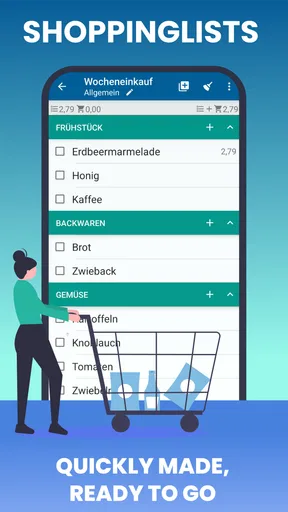
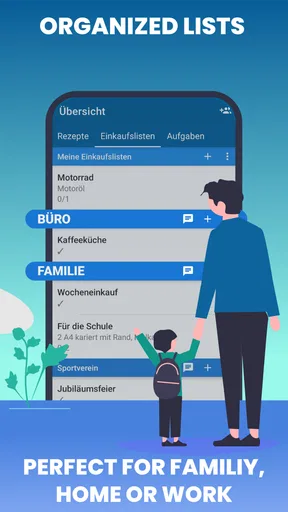
The app begins with a simple prompt to start a new list. You can customize your lists for different occasions — groceries, hardware, party supplies, you name it. I liked that it allowed me to save multiple lists, so I didn’t have to mix up my shopping for the weekend barbecue with my regular grocery needs.
Making separate lists work harder
Multiple lists are most useful when they represent genuinely different routines rather than every tiny errand. I would keep one for weekly food staples, another for a planned gathering, and perhaps a third for household supplies. That separation lets me open the relevant list quickly without scrolling through a long collection of unrelated items. If you make too many lists, though, the organizational benefit can disappear: remembering where you recorded something becomes its own chore.
A practical habit is to add an item as soon as you notice it is running low, rather than waiting until you are already in the shop. For example, if I finish the last tin of tomatoes while cooking, I can capture it then and avoid relying on memory later. Voice input can make that especially convenient when my hands are occupied. Before leaving, I would still glance over the list and remove anything I no longer need; quick entry is helpful, but it can also preserve a passing thought that is not actually a purchase.
Worth Reading Before You Choose

EA SPORTS FC Mobile 26 Is a Bigger Football Game, but It Takes Time

Flipboard Shows What News Apps Must Do Beyond the Feed

Switching to Android Auto Means Rethinking Your Driving Routine

Google Calendar Makes a Crowded Week Easier to Manage

Ludo King Makes the Most of the Minutes Between Plans

Baby Panda World Brings Quick Play to Modern Phones, but Its Game Library Feels Busy
Features That Make Life Easier
One of the standout features is its voice input capability. Instead of typing everything out, I just spoke into my phone, and voilà! My list was ready. This came in handy when I was multitasking, like cooking dinner while trying to remember what I needed for the next meal.
The app also supports real-time synchronization. This means you can share your lists with family members or roommates. I tested this out by sending my grocery list to my partner. No more duplicate purchases or forgotten items, and we were both on the same page. Quite literally!
Sharing is particularly helpful when two people may visit the same shop at different times. If one person picks up an item, the other can see the change instead of buying it again. In a busy household, I would agree on a simple rule first: whoever adds something should make the item clear enough for the other person to recognize. “Milk” may be enough for a familiar weekly shop, but a specific size or type can prevent a frustrating wrong purchase when preferences matter.
Another nifty feature is the built-in barcode scanner. I could scan items as I added them to my cart, and the app checked them off my list automatically. It felt like having a personal shopping assistant with me.
In practice, I see scanning as a convenience for recognizable packaged goods, not a reason to stop checking the list. A barcode can help with a product you buy repeatedly, but it is less useful for loose produce, items without packaging, or a substitute chosen on the spot. I would treat the checked-off state as a reminder of progress rather than proof that every detail of a purchase is correct. For a quick run, that is a sensible trade-off; for a carefully controlled household stock list, I would still verify quantities and variants myself.
User Experience and Design
The design of the app is minimalistic yet functional. It doesn’t bombard you with unnecessary features, sticking to what it’s meant to do — making shopping lists. The color scheme is easy on the eyes, and the navigation is intuitive. Even if you aren’t tech-savvy, you’ll have no trouble finding your way around.
That simplicity is also why it feels different from building a list in a notes app. Notes can be more flexible for recipes, reminders, and long explanations, but they often leave you manually editing or deleting lines as you shop. Lister is the more focused choice when you want a dedicated shopping list and a clear sense of what remains. A general task manager may be better if shopping is only one part of a broader system of deadlines and recurring projects.
For a realistic weekend example, I might create a barbecue list in advance, add forgotten items as they come to mind during the week, then share it with the person stopping at the store. At the shop, we can check items off rather than trying to reconstruct the plan from a conversation. The useful part is not any single clever feature; it is having one current version of the list instead of scraps of paper, texts, and memory competing with one another.
One thing I appreciated was the integration with digital assistants like Alexa and Google Assistant. It allowed me to add items to my list even when I wasn’t directly using the app. I just shouted out in the kitchen, and my list was updated. Pretty neat, right?
I would use that hands-free route for quick additions, then review the list later when I can see it clearly. Spoken item names can be brief or ambiguous, especially when there are similar products in the household. A thirty-second check before a shopping trip is a good way to catch a misheard or incomplete entry. If you prefer to keep shopping information in one place and do not use voice assistants, you can simply enter items directly instead.
Where the simple approach has limits
While Shopping list — Lister does a lot right, there are a few areas where it could improve. For instance, the app could benefit from a price comparison feature. Knowing where to get the best deals would add immense value, especially when budgeting is a priority.
That distinction matters if your shopping decisions depend on comparing unit prices, tracking a household budget, or choosing a store based on current offers. Lister helps organize what to buy; it should not be mistaken for a tool that decides where or how cheaply to buy it. I would pair it with a separate budgeting method if cost tracking is central to my routine, rather than expecting a checklist to answer financial questions.
Additionally, while the app is generally smooth, there were a couple of times when it lagged slightly during list updates. Nothing too disruptive, but worth noting for future updates.
Even a brief delay is noticeable when I am checking off several items in a row or coordinating with someone else. If an update seems slow, I would pause and confirm the list has caught up before making a second change, rather than tapping repeatedly and risking confusion. This is a modest inconvenience, but it is precisely the sort of friction that matters in a tool meant to be quick in a crowded aisle.
Who I would recommend it to
I think Lister is best for people who want a dedicated, low-fuss place for everyday shopping notes, especially households that benefit from sharing a current list. It can also suit someone who shops for different occasions and wants to keep grocery needs apart from party or home-supply errands. The voice and scanning options add convenience when they match the way you shop, but the basic appeal is still the straightforward list workflow.
I would suggest looking elsewhere if you need recipes connected to ingredients, meal plans that generate a shopping list, detailed spending reports, or store-by-store price comparisons. Those needs call for a broader planning or budgeting tool. Likewise, if you only make a short list occasionally, a paper note or your phone’s existing notes app may be enough; installing a dedicated app is worthwhile only if its separate lists and shared workflow save you effort.
The app has been around since October 2011 and supports Android 8.0 or later. That makes the minimum system requirement worth checking on an older device before you rely on it for a trip. For most people deciding whether to try it, the more important question is simpler: will you actually add items as you notice them? A list stays useful only when it reflects what you need now, so a small habit of updating it at home does more than elaborate organization.
Final Thoughts
Overall, Shopping list — Lister has become a staple on my phone. It’s not just an app; it’s a companion that makes shopping straightforward and even a bit fun. Whether you’re a meticulous planner or someone who shops on a whim, this app adapts to your style.
If you’re often on the go and need something to keep your shopping organized, I’d definitely recommend giving Shopping list — Lister a try. It's a small download with a big impact on your daily routine. So, next time you’re heading out for groceries, let this app do the heavy lifting for you. Happy shopping!
My recommendation is strongest for people who want less mental bookkeeping, not for shoppers looking for an all-in-one commerce companion. I would start with just one recurring grocery list and one occasional list, use voice entry only when it is genuinely quicker, and invite another shopper only if both of you will keep the shared list current. That modest setup makes it easier to tell whether the app solves a real problem before adding more routines.
So the verdict is practical rather than grand: Lister earns a place on my phone because it puts a familiar task in a focused, shareable format. Its limits around price research and the occasional lag are worth keeping in mind, but they do not undermine its core purpose. If your usual alternative is a note you forget to update or a message thread that gets buried, I think this is a sensible free option to try; if you need deeper planning, choose a tool built for that instead.
Pros
- User-friendly interface for easy navigation.
- Syncs across devices for seamless access.
- Customizable lists to suit individual needs.
- Barcode scanner for quick item addition.
- Supports voice input for hands-free use.
Cons
- Limited free version features.
- Occasional sync delays reported.
- Ads present in the free version.
- No offline mode available.
- Limited integration with other apps.
FAQs for Shopping list — Lister
What features does Shopping list — Lister offer?
Shopping list — Lister offers a range of features to streamline your shopping experience. It includes voice input for easy list creation, barcode scanning to quickly add items, and customizable categories to organize your list. Additionally, it supports cloud syncing, ensuring your lists are accessible across all devices.
Is Shopping list — Lister available for both Android and iOS?
Yes, Shopping list — Lister is available for download on both Android and iOS platforms. You can find it on the Google Play Store for Android devices and the Apple App Store for iOS devices, ensuring compatibility with a wide range of smartphones and tablets.
Does Shopping list — Lister require an internet connection to function?
No, Shopping list — Lister does not require a constant internet connection to function. While features like cloud syncing need internet access, the core functionality of creating and managing lists can be used offline, making it convenient for in-store use where connectivity may be limited.
Can I share my shopping lists with others using Shopping list — Lister?
Absolutely, Shopping list — Lister allows users to share their lists with others easily. You can sync your lists with family members or friends, ensuring everyone is on the same page, which is especially useful for coordinating group shopping tasks or managing household supplies.
Is there a cost associated with using Shopping list — Lister?
Shopping list — Lister offers both free and premium versions. The free version provides basic functionality, while the premium version unlocks additional features like ad removal, advanced customization options, and enhanced support. You can choose the version that best suits your needs and budget.


